GitHub Brick Breaker
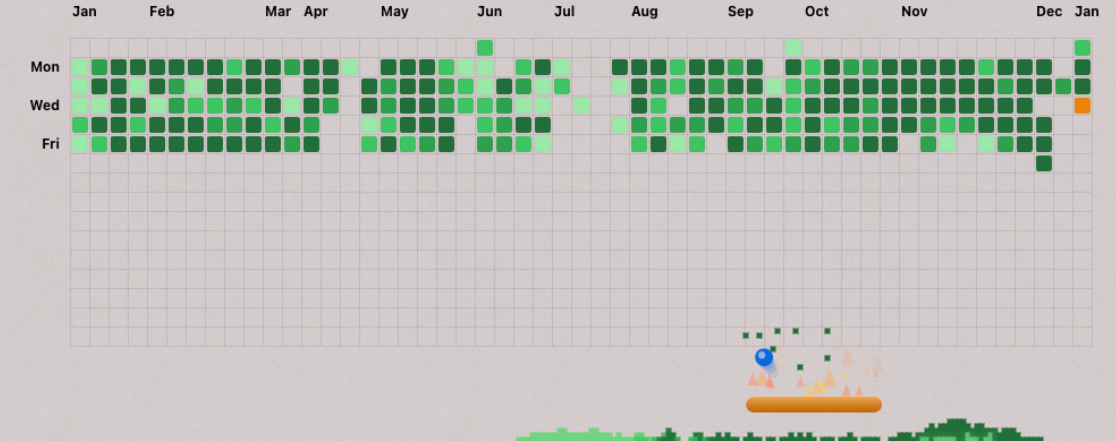
I turned a year of daily GitHub contributions into a playable brick breaker. Each green square becomes a brick — destroy evidence of your own commitment with motion trails, particle physics, and satisfying arcade feel.
The idea
I saw someone on Reddit who’d turned their GitHub contribution graph into a brick breaker game. I thought it was brilliant. Games and web development, two things I love, smashed together.
I build every single day. That green graph is a year of work compressed into squares. Turning it into something playable felt right. More than that, it felt meaningful. Each brick is a day I showed up. Breaking them isn’t just satisfying. It’s destroying evidence of my own commitment in the most fun way possible.
How it works
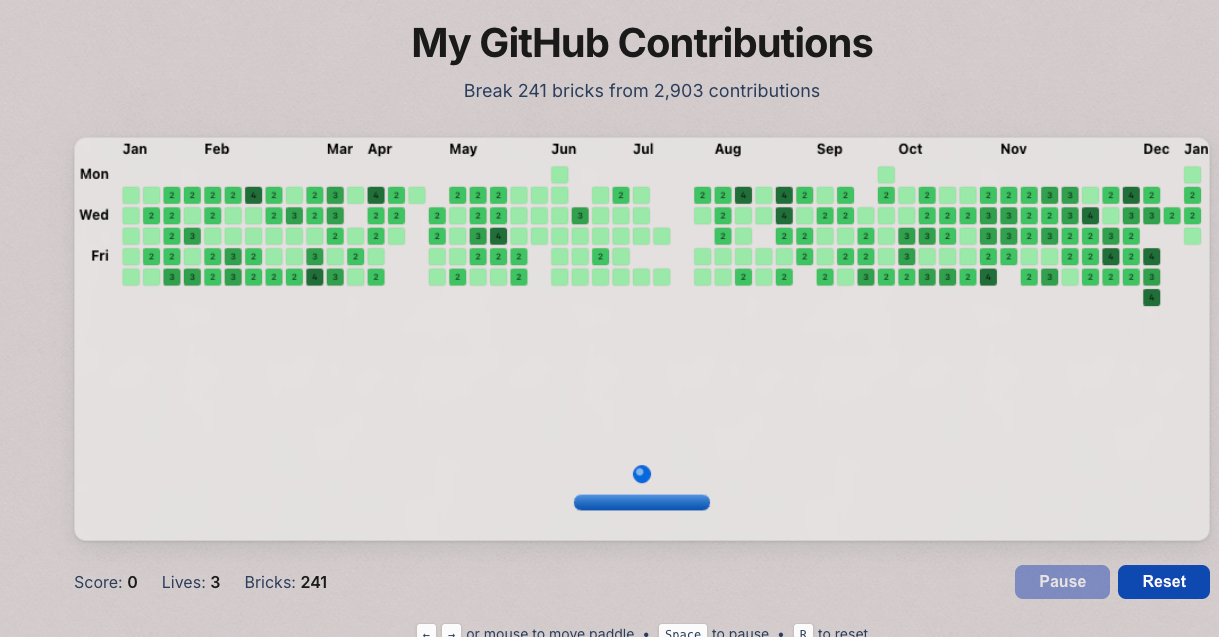
Each day with contributions becomes a brick. The color and strength match GitHub’s contribution levels:
- Light green (1-3 contributions) = 1 hit to break
- Medium green (4-6 contributions) = 2 hits
- Dark green (7-9 contributions) = 3 hits
- Darkest green (10+ contributions) = 4 hits
The game fetches contribution data from both my GitHub accounts (tehwave and peterchrjoergensen) and merges them. If I made 3 contributions on one account and 5 on the other, that day becomes a single brick worth 8 contributions — harder to break, worth more points. The aggregation happens at build time, so the game loads instantly without API calls.
The technical stack
The whole thing runs in a single Astro component. At build time, the frontmatter fetches contribution data from GitHub’s GraphQL API:
const contributionData = await fetchMultipleContributions(profiles);This gets baked into a JSON blob that the client-side game reads from a data-bricks attribute. No runtime API calls. The game works offline once loaded.
The game itself is ~2,400 lines of vanilla JavaScript in a <script> tag — no React, no game frameworks. Just Canvas API and requestAnimationFrame. I wanted something self-contained that wouldn’t bloat the bundle.
The game loop
Standard pattern: requestAnimationFrame drives the loop, calling update() then render() every frame. Physics run at screen refresh rate (typically 60fps).
function gameLoop() {
  if (gameState !== GameState.PLAYING) return;
  update();
  render();
  animationFrameId = requestAnimationFrame(gameLoop);
}
Collision detection
For bricks, I use AABB (Axis-Aligned Bounding Box) collision — check if the ball’s bounding box overlaps the brick’s box. Fast and good enough for rectangles.
The tricky part is figuring out which side the ball hit. The bounce direction depends on it. I calculate penetration depth on all four sides and bounce off whichever side has the smallest overlap:
const minOverlapX = Math.min(overlapLeft, overlapRight);
const minOverlapY = Math.min(overlapTop, overlapBottom);

if (minOverlapX < minOverlapY) {
  ball.dx = -ball.dx; // Hit left or right
} else {
  ball.dy = -ball.dy; // Hit top or bottom
}
Paddle hit angle
Where the ball hits the paddle determines its bounce angle. This gives players control:
- Hit left edge → bounces up-left (~135°)
- Hit center → bounces straight up (90°)
- Hit right edge → bounces up-right (~45°)
The math maps the hit position (0 to 1) to an angle range of ±63° from vertical:
const hitPos = (ball.x - paddle.x) / paddle.width;
const angle = -Math.PI / 2 + (hitPos - 0.5) * Math.PI * 0.7;
The effects that make it feel good
I spent most of my time on visual polish. A brick breaker without juice feels dead. You need that satisfying thunk when the ball hits the paddle, that sense of speed when you’re chaining hits, that panic when you’re down to your last life.
These aren’t just decorations — they’re the difference between a game you play once and a game that makes you go “one more try.”
Motion trails
When the ball exceeds base speed, it draws faded copies at previous positions. Each frame, I push the ball’s position onto a trail array (max 8 points). When rendering, older points are smaller and more transparent:
ballTrail.forEach((pos, i) => {
  const opacity = (i / ballTrail.length) * 0.5;
  const size = ball.radius * (0.5 + (i / ballTrail.length) * 0.5);
  // Draw faded circle at pos
});
This creates a comet-tail effect that helps you track fast-moving balls.
Ball elongation (squash & stretch)
Above 1.5× base speed, the ball stretches into an ellipse pointing in its movement direction. Classic animation principle — fast objects appear elongated.
I use atan2 to get the velocity angle, then rotate the canvas and draw an ellipse instead of a circle:
const angle = Math.atan2(ball.dy, ball.dx);
const elongation = Math.min(speed * 0.8, ball.radius * 2);

ctx.translate(ball.x, ball.y);
ctx.rotate(angle);
ctx.ellipse(0, 0, ball.radius + elongation, ball.radius, 0, 0, Math.PI * 2);
Paddle wobble
When the paddle changes direction suddenly, it wobbles like gelatin. Spring physics: the wobble accelerates toward center, with damping so it settles down.
The paddle also skews (squash & stretch) based on velocity. Moving left compresses the left side; moving right compresses the right. Subtle, but it makes the paddle feel physical instead of robotic.
Fire particles on last life
When you’re down to one heart, the paddle catches fire. Orange-to-red triangular particles spawn and rise. No HUD warning needed. The fire is the warning.
if (lives === 1) {
  // Spawn flame particles near paddle
  fireParticles.push({
    x: paddle.x + Math.random() * paddle.width,
    y: paddle.y - 5,
    vx: (Math.random() - 0.5) * 2,
    vy: -1 - Math.random() * 2,
    life: 1,
    size: 3 + Math.random() * 3,
  });
}
Falling sand (cellular automaton)
This is my favorite effect. Broken bricks don’t just vanish — they explode into particles that fall and settle.
I use a grid-based cellular automaton instead of individual particle physics. Each cell either contains colored sand or is empty. Every frame, I process from bottom to top:
- If the cell below is empty → fall down
- Otherwise, try to slide diagonally (random left or right)
- If nothing’s open → stay put
if (sandGrid[y + 1][x] === null) {
  sandGrid[y][x] = null;
  sandGrid[y + 1][x] = cell;
} else {
  const dir = Math.random() < 0.5 ? -1 : 1;
  if (sandGrid[y + 1][x + dir] === null) {
    sandGrid[y][x] = null;
    sandGrid[y + 1][x + dir] = cell;
  }
}
Processing bottom-to-top prevents particles from moving multiple times per frame. The grid approach is O(cells) instead of O(n²) for collision checks — hundreds of particles with zero performance hit.
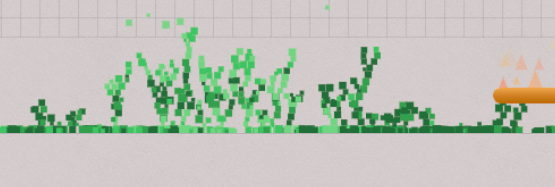
For visual smoothness, neighboring particles blend colors (70% self, 30% neighbors). This creates soft gradients instead of harsh pixel edges.
Extra visual particles (sparkles)
On top of the sand, I added small visual-only particles that fade out and never become part of the grid. They spawn on brick hits, fall with gravity, and disappear quickly — just enough sparkle to sell impact without clutter. They’re tiny (2px radius) with an alpha fade, so you feel the hit without losing clarity in the playfield.
Scoring and progression
High score tracking
I track the best score locally and update it on both win and loss. It’s just localStorage with a single key (brick-breaker-high-score), loaded at startup and written when you beat your previous best. The UI updates via aria-live so screen readers announce changes, and the overlay calls out “New High Score!” when you earn it.
Power‑up: today’s brick
GitHub shows today’s square — I make it an orange accent (one hit) that triggers a short power‑up when you break it. For 10 seconds scores are doubled (×2), and the canvas gets a subtle animated chromatic aberration border — red/green/blue strokes offset with sine waves so it feels alive without being noisy.
Responsive design decisions
The game adapts to screen size. Canvas width is constrained to 320-1000px. Brick size scales proportionally — they’re always square, like GitHub’s graph.
On small screens (phones in portrait), the game shows a “rotate your device” message and pauses. The detection is simple:
function shouldShowRotateMessage() {
  return isSmallDevice() && isPortrait();
}
A small device is anything under 500px viewport height or 640px width. Portrait is when height exceeds width. The game pauses automatically when the message appears and resumes when you rotate.
Building it with AI
I made this in one Wednesday evening. I wrote almost no code by hand. Instead, I pair-programmed with Claude Sonnet 4.5 through GitHub Copilot in VS Code.
My workflow:
- Describe what I want — “Add a motion trail effect to the ball when it’s moving fast”
- Review the implementation — Read through the generated code, understand the approach
- Test and give feedback — “The trail is too long, feels laggy. Make it shorter and fade faster”
- Iterate — Repeat until it feels right
The AI handled the Canvas API details, the math for collision detection, the particle systems. I focused on game feel: testing, adjusting constants, rejecting approaches that looked wrong.
Some things required multiple attempts. The paddle wobble took a few iterations to get the spring physics feeling bouncy but not jittery. The sand simulation needed tweaking to look natural instead of mechanical.
After getting the core mechanics working, I asked my custom Documentator agent to go through and explain why each decision was made. The paddle collision angle math has a full breakdown. The sand grid explains why we process bottom-to-top. The wobble spring physics are annotated with the reasoning.
The result is ~2,400 lines I can actually maintain, because I understand every line even though I didn’t type most of them. Future me will thank past me for those explanations.
Performance optimizations
A game that animates 60 times per second needs to be careful about wasted work. Here’s what I did to keep it fast:
Intersection Observer
The game pauses automatically when you scroll past it. No point running physics and rendering frames nobody sees:
intersectionObserver = new IntersectionObserver((entries) => {
  entries.forEach((entry) => {
    if (!entry.isIntersecting && gameState === GameState.PLAYING) {
      pauseGame();
    }
  });
});
When the canvas leaves the viewport, the game loop stops. Scroll back, resume where you left off. This is especially important on long pages where the game sits in a section — no reason to burn CPU cycles when users are reading other content.
Page Visibility API
Same principle for browser tabs. Switch tabs, the game pauses:
document.addEventListener("visibilitychange", () => {
  if (document.hidden && gameState === GameState.PLAYING) {
    pauseGame();
  }
});
Prevents the game from running in the background eating battery on mobile.
Debounced resize handler
Window resize events fire constantly while dragging. Recalculating brick positions every single frame during resize is wasteful:
handleResize = debounce(resizeCanvasHandler, 100);Instead, I wait 100ms after the last resize event before recalculating. Smooth dragging, no jank, and the grid updates the moment you stop.
Cellular automaton for particles
The falling sand uses a grid-based cellular automaton instead of individual particle objects with physics. Each cell is either empty or contains sand. Processing the grid is O(cells) — just iterate once per frame.
Individual particles would be O(n²) for collision checks. Every particle against every other particle. With hundreds of particles from brick explosions, that’s thousands of checks per frame. The grid approach handles it trivially.
Build-time data fetching
GitHub contributions are fetched once at build time, not on every page load:
const contributionData = await fetchMultipleContributions(profiles);The data gets baked into a JSON blob in the HTML. No API calls at runtime. The game works offline. First paint is instant.
What I’d change
The game isn’t perfect:
- No sound — Audio would add a lot of juice. Brick break sounds, paddle hit, game over music. Right now you’re missing half the feedback loop.
- Mobile touch could be smoother — Touch input works, but it’s not as responsive as mouse. The tactile connection isn’t quite there yet.
- Difficulty balance — Days with lots of contributions (4-hit bricks) might be too hard. Haven’t tested enough to know if success feels earnable or frustrating.
But it works. And it shows something real: I show up and build every day. Now you can play through that commitment.
Source code
The entire game lives in one Astro component on GitHub. All 2,400 lines of canvas rendering, physics, and particle effects.
If you spot something broken, have ideas for improvements, or just want to see how the cellular automaton works, dig in. Feedback welcome.
Play it
Try to clear all your bricks without losing three lives.